
Conducting Freedom To Operate (FTO) Searches
Overview
A Freedom to Operate (FTO) searches traditionally meant brute-forcing through search results manually, however NLPatent enables users to conduct searches significantly faster.
Rather than organizing results by keyword match, NLPatent ranks patents by semantic similarity, meaning the most potentially risky patents surface first. Paired with Ask NL Patent for targeted claim analysis, a meaningful first-pass FTO review can be completed in a fraction of the time.
See Video Instructions Here, or the text instructions below:
How to Run an FTO Search
Step 1: Create a New Search + Write the Query
From the main dashboard, click Create a New Search and give it a descriptive name (e.g., "FTO - Product X"). Hit the checkmark to confirm.
This is the most important step. In the search bar, describe the invention in plain natural language focus on what it is, how it works, and what makes it distinct. You can either use Document Upload to help you create a query or write it yourself.
Here are a few things to keep in mind:
- There is no need to list every alternative name or synonym for a term. NLPatent's AI understands semantic meaning and naming variations.
- Queries should be specific enough to capture the core concept, but not so narrow that related risks are missed. For FTO purposes, starting broad and narrowing down tends to work best.
- Describe the invention itself — not what to search for. For example, instead of "show me US patents about X," write a description of X as if explaining what it is and how it works.
Step 3: Apply Filters
Go to the filters button in the bottom right corner to apply filters relevant to the FTO scope:
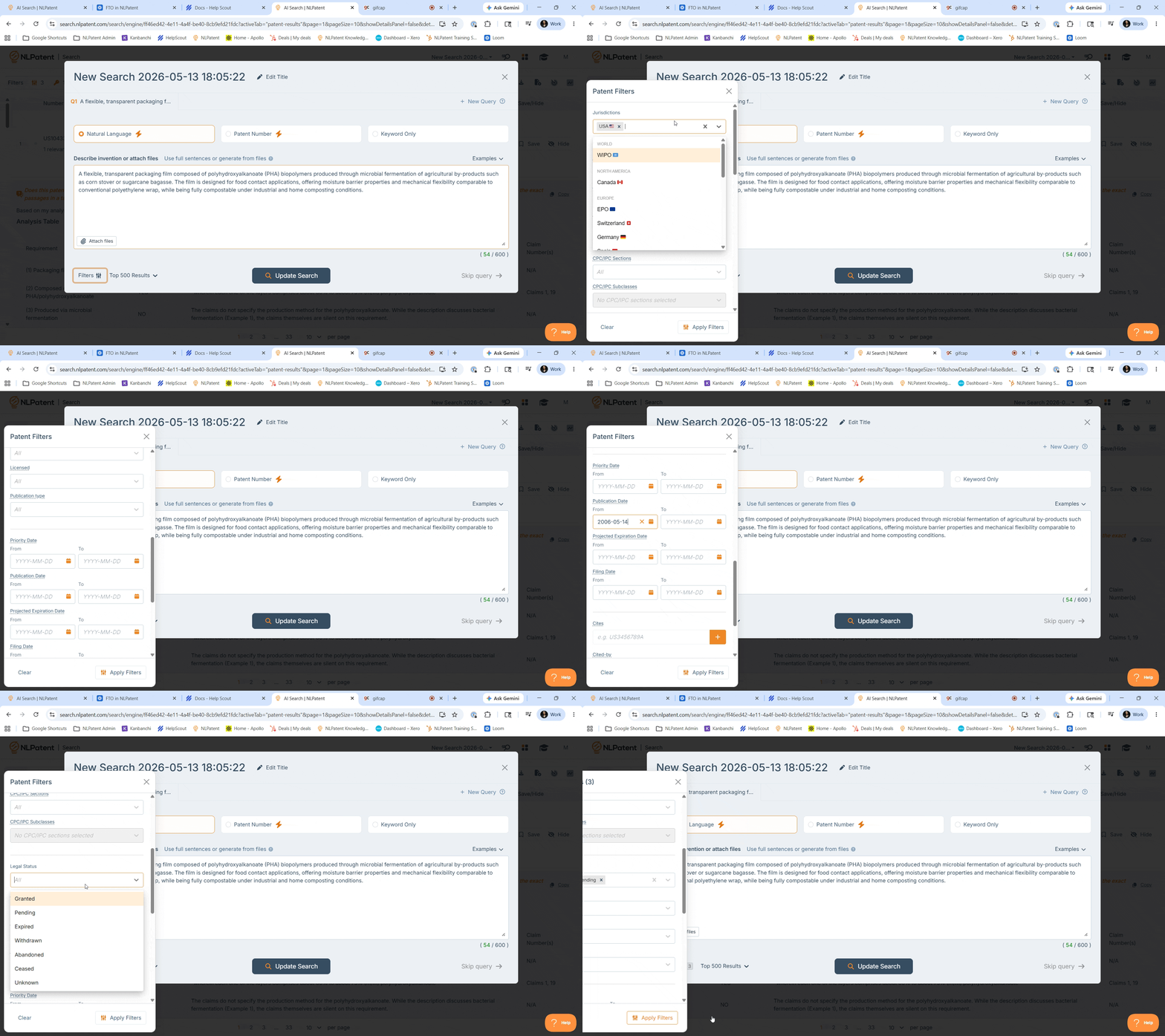
- Jurisdiction: To focus on a specific market (e.g., the US), filter to that jurisdiction.
- Legal Status: To focus only on currently enforceable patents, filter to Granted/Pending. Users may also leave this open when expired patents are also relevant for historical context or landscape purposes.
- Publication Date: Similarly, apply a date filter to exclude anything published more than 20 years ago.
Filters can be adjusted at any time without re-running the search. Once the query is ready + the right filters are applied, click Start Search.
Step 4: Review Results with Ask NL Patent
Results are ranked from most to least semantically similar to the query the top results represent the greatest potential risk and should always be reviewed first.
Rather than opening each patent individually, use Ask NLPatent to run a targeted question across all results on the page. This is particularly powerful for FTO because claim-specific questions can be asked at scale.
A useful FTO prompt looks something like:
"Are these concepts disclosed within the claims
(1) Feature A
(2) Feature B
(3) Feature C.... etc.
If all three are present in the claims where are they present cite the exact passages in a table format. Based on the claims does this pose an FTO risk?"
You can also see a list of prompts that we recommend in our Prompt Library Article.
Tailor the question to the specific concept(s) that define the product. Ask NLPatent generates an answer for each patent based solely on the content of that document significantly reducing hallucination risk compared to general-purpose AI tools.
Step 5: Use Keyword Filters and Highlights Strategically
When an FTO hinges on a very specific term (e.g., a strain name, a compound, a proprietary process name), use the Keyword Filter to restrict results to only patents containing that exact term. This is especially useful when a specific term must appear in the claims.
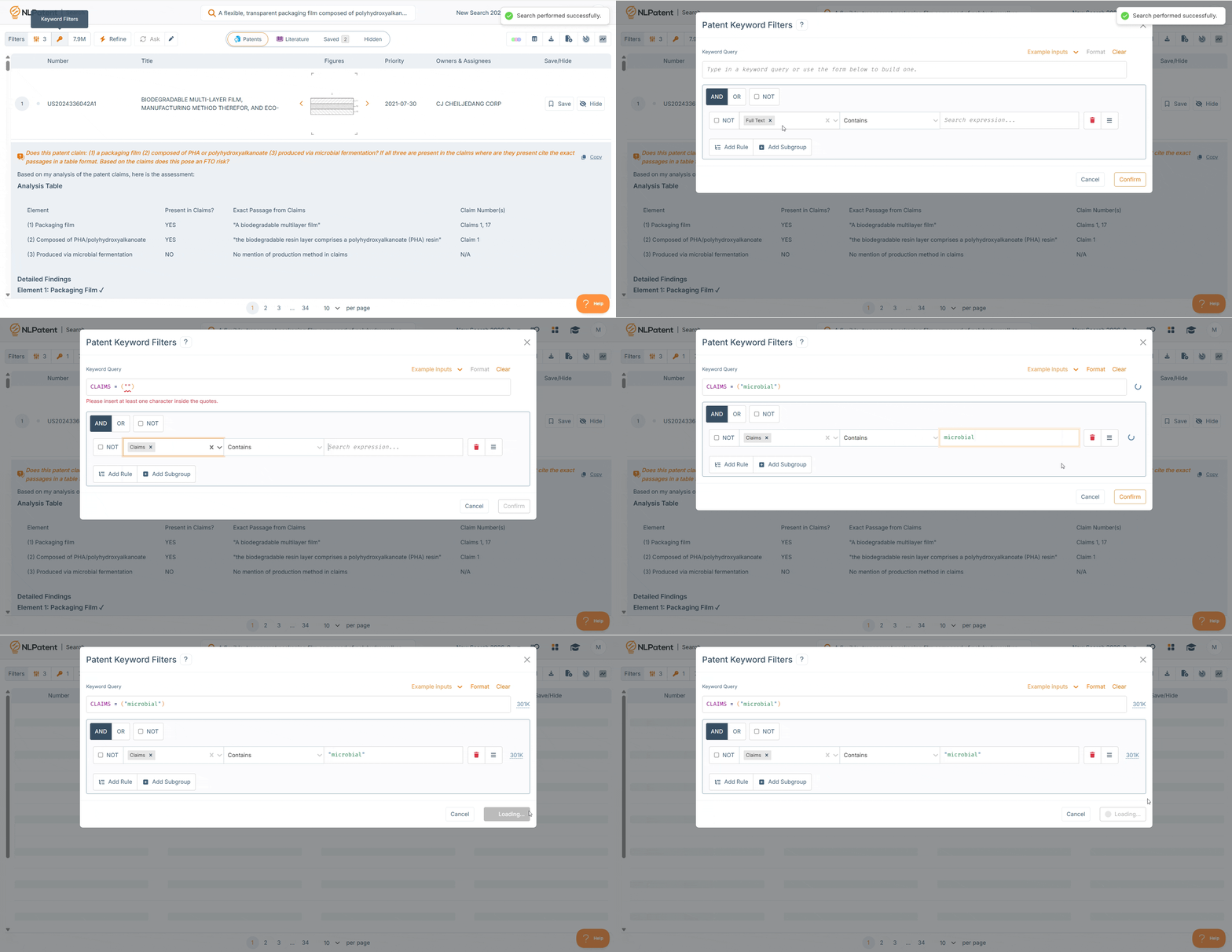
- Keyword Filter: Restricts the search results to only those containing the specified term. Patents without it will not appear.
- Keyword Highlight: Keeps all results visible but flags where the term appears within each patent. Hovering over the highlight count and clicking the magnifying glass jumps to the exact location in the document.
The filter is the right choice when the term is essential to the FTO question; the highlight is better when the goal is to see where it appears without narrowing the result set.
Step 8: Refine Results
When a highly relevant patent is found, it can be used to refine the search. Highlight a specific claim or passage, click Save this section, then hit Refine. The AI will re-rank all results based on the additional context provided.
This is useful when results should cluster around a specific claim scope rather than the broader product description. Plain-text descriptions can also be added as refinement input via the Known Prior Art feature useful when academic literature or other non-patent sources define a key concept.
After refining, up/down arrows on each result show how rankings have shifted relative to the previous search.
Wrapping Up
Once the review is complete, export results using the Export button in the top-right toolbar. Options include exporting saved results only, or the full result set across one or all queries.
For a broader view of who is filing in the technology space — useful context for FTO strategy — the Visualization tool (Part of NLPatent Premium) will auto-cluster the top 100 results by concept and display top applicants by filing volume.
Tips & Troubleshooting
Results don't seem relevant. Revisit the query. Make sure it describes the invention rather than instructing the AI (e.g., avoid "show me patents about X" — describe what X is and how it works instead). If the query is very narrow, try loosening the specificity.
Relevant patents are scattered throughout the list. This can happen when claims are structured differently from the description, or when the query emphasizes aspects that appear more prominently in descriptions than claims. Adding a keyword filter scoped to claims only can help pull claim-specific language to the top.
Ask NL Patent is returning "yes" answers far down the list. Rankings are based on overall semantic similarity, not the Ask NL Patent answer. Using keyword filters scoped to the claims section helps surface patents where a specific concept is explicitly claimed — tightening the result set to what matters most from an FTO standpoint.